Table of Contents
- What Is an Author Media Kit and Why You Need One
- Essential Elements of a Digital Press Kit for Authors
- What to Include Beyond the Basics: Bio, Sell Sheet, and Interview Prep
- Author Press Kit Template: A Step-by-Step Build
- Author Media Kit Examples: What Good Looks Like
- Best Tools for Creating Author Media Kits
- Author Website Best Practices for Hosting Your Kit
- Legal, Copyright, and Analytics: The Angles Most Authors Miss
- Frequently Asked Questions
Last Updated: September 25, 2026
What Is an Author Media Kit and Why You Need One
A digital press kit is a single, ready-to-share folder of files that tells a journalist, librarian, or book club host everything they need to know about you and your book. For authors, it's the difference between "send me more info" and a confirmed feature.
This guide from ReaderReach breaks down exactly what to include in a digital press kit for authors, from headshots to sell sheets. We'll also show you how to build one in an afternoon.
Here's the thing most authors get wrong: they build a press kit once, email it out, and never look at it again. Then a podcast host asks for a "short bio" and they scramble to cut 400 words down to 50.
What a Digital Press Kit Actually Does for You
It removes work for the person deciding whether to feature you.
That's it. A good kit answers their questions before they ask. Book club coordinators, radio producers, and library event planners are busy. If your kit makes their job easy, you get picked.
A strong kit also gives you one link to share everywhere. No more attaching five files to every email.
Essential Elements of a Digital Press Kit for Authors
Every author press kit needs eight core assets. Miss one and you'll be writing it in a panic later.
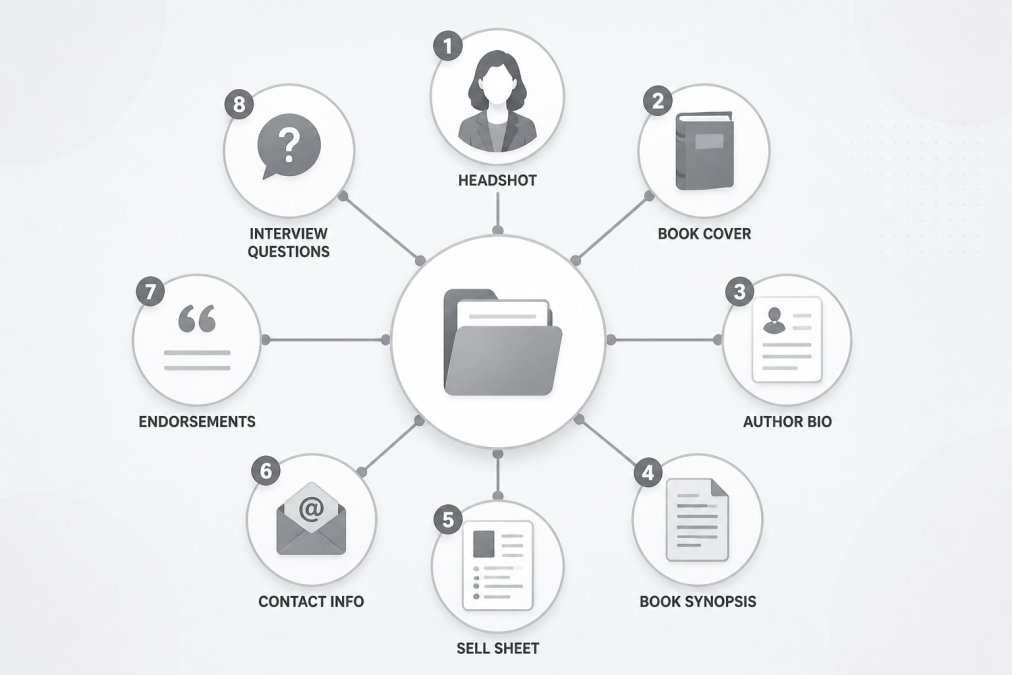
- Professional headshot (high-resolution)
- Book cover image and 3D mockups
- Author bio in two lengths
- Book synopsis (short and long)
- Sell sheet with ISBN and publication date
- Contact information for media inquiries
- Endorsements and testimonials
- Sample interview questions
Professional Author Headshots and Photographer Credit
Your headshot should be high-resolution, at least 300 DPI, and shot against a clean background. Media outlets print these. A phone selfie won't survive print.
Always include the photographer's credit. It's a small courtesy that keeps photographers willing to work with you, and some outlets require it.
Include two versions: a tight head-and-shoulders crop and a wider shot with some breathing room. Different layouts need different crops.
Book Cover Images, Mockups, and ISBN Details
Send the flat cover as a high-resolution PNG or JPG. Add a 3D mockup too, because podcasts and blogs often want a visual with depth.
List your ISBN, publication date, genre, and page count in plain text. Don't make someone dig through a PDF for your ISBN. Put it in the body of the kit.
What to Include Beyond the Basics: Bio, Sell Sheet, and Interview Prep
The basics get you considered. The extras get you booked.
Most authors stop at a headshot and a synopsis. That's a mistake. The authors who get consistent media coverage prepare for the interview before anyone asks.
Author Bio: Short and Long Versions
Write your author bio in two lengths: 50 words and 150 words.
The 50-word version goes in event programs and podcast show notes. The 150-word version works for feature articles and press releases.
Lead with the most interesting thing about you. Not "John Smith is an author who lives in Ohio." Try "John Smith spent 12 years as a firefighter before writing his first thriller."
Book Synopsis, Tip Sheet, and Sample Interview Questions
Your book synopsis needs a one-paragraph version and a full-page version.
A tip sheet is a list of 5-10 talking points or angles from your book. Hosts love these because they spark conversation ideas. Write them as questions a host could ask you.
Sample interview questions save a producer real time. Offer 8-10, mixing light questions with deeper ones.
Author Press Kit Template: A Step-by-Step Build
Here's a workflow you can finish in one sitting.
Step 1: Gather your raw files. Collect your headshot, cover art, and any mockups in one folder. Name them clearly: lastname-headshot-2026.jpg, not IMG_4821.jpg.
Step 2: Write your bios. Draft the 50-word and 150-word versions. Read them out loud. If you stumble, cut words.
Step 3: Write your synopsis. Do the short and long versions. Keep the short one under 100 words.
Step 4: Build your sell sheet. One page with cover image, ISBN, publication date, genre, price, and a short pitch.
Step 5: Add your endorsements. Pull any blurbs or reviews into a clean list with attribution.
Step 6: Write sample interview questions. Aim for 8-10.
Step 7: Add contact info. Include an email you actually check. A dedicated media email works well.
Step 8: Package it. Put everything in one folder and create a shareable link.
| Asset | Format | Length or Size | Where It Goes |
|---|---|---|---|
| Headshot | JPG, 300 DPI | 2 versions | Media, event programs |
| Book cover | PNG + 3D mockup | High-res | Blogs, podcasts |
| Author bio | Text | 50 and 150 words | Show notes, features |
| Synopsis | Text | 100 words and 1 page | Press releases |
| Sell sheet | 1 page | Bookstores, libraries | |
| Interview questions | Text | 8-10 questions | Podcasts, radio |
Author Media Kit Examples: What Good Looks Like
The best author media kit examples share three traits.
First, they're scannable. A visitor finds the bio, the cover, and the contact email in seconds. No hunting.
Second, they offer downloads. Every asset sits behind a clean "download" button rather than buried in a wall of text.
Third, they're current. The publication date matches the actual book, and the headshot looks like the author today.
Look at any well-known author's site and you'll see the same pattern: a dedicated press or media page, clearly linked from the main menu. That page is the kit.
Best Tools for Creating Author Media Kits
You don't need expensive software. You need a place to host files and a page to organize them.
For file hosting, cloud storage folders work fine. So does a simple page on your own site.
For design, free tools can build a clean one-page sell sheet in under an hour. Keep it simple: your cover, your name, your details.
The real work isn't the tool. It's the outreach that follows. That's where a service like ReaderReach helps, since it handles genre-matched research and manages the follow-ups that turn a kit into actual bookings.
Author Website Best Practices for Hosting Your Kit
Put your kit on its own page, and link it from your main menu. Label it "Press" or "Media Kit" so people find it fast.
Keep the page light. Large image files slow a page down, and slow pages lose visitors.
Use clear file names and alt text on every image. That helps screen readers and search engines both.
File Management, Accessibility, and Mobile-First Design
Most people will open your kit on a phone. That changes how you build it.
- Keep the page to one column on mobile
- Use buttons big enough to tap
- Compress images so pages load fast
- Add alt text to every image
- Offer a plain-text version of your bio
Legal, Copyright, and Analytics: The Angles Most Authors Miss
Two things trip up authors here: permissions and tracking.
On permissions, make sure you have the right to share every image in your kit. That includes your headshot, your cover, and any endorsement logos. Photographers usually retain copyright, so confirm you can grant media use.
On tracking, add a simple analytics tool to your press page.
Frequently Asked Questions
What is the difference between an author media kit and a press kit?
The terms are often used interchangeably, but there is a subtle difference. A press kit typically focuses on media outreach: press releases, interview questions, and contact details for journalists. A media kit is broader and includes reader-facing assets like book club discussion guides and endorsements. For most independent authors, one well-organized digital press kit covers both needs. Label it clearly on your author website so journalists, podcasters, and book clubs can find what they need without emailing you first.
Do independent authors really need a digital press kit?
Yes, especially if you are pitching book clubs, podcasts, or local media. A digital press kit saves everyone time: instead of answering the same questions repeatedly, you send one link with your bio, headshots, book synopsis, and contact details. A ready-to-share kit allows podcast hosts and book club coordinators to evaluate your fit in minutes rather than waiting on back-and-forth emails.
Where should I host my author press kit on my website?
Create a dedicated page at a clean URL like yoursite.com/press or yoursite.com/media-kit. Link to it from your homepage footer, your About page, and your email signature. Avoid burying downloads behind a contact form; journalists and book club organizers need instant access. If you use a platform like ReaderReach, you can also include the link in your outreach identity so every pitch email points recipients straight to your kit.
What file formats should I use for author headshots and book covers?
Offer high-resolution JPEG or PNG files at 300 DPI for print use, plus smaller web-optimized versions under 500 KB for quick downloads. Include a transparent PNG of your book cover for media overlays. Name every file clearly, such as author-name-headshot-highres.jpg, so recipients can identify assets without opening them. Add a photographer credit line in your kit and confirm you have permission to share any image you include.
Building a press kit is the easy part. Getting it in front of the right book clubs, libraries, and podcast hosts is where most authors stall out. ReaderReach handles that work for you with genre-matched outreach, a dedicated author identity, and a Campaign Desk that manages every reply and follow-up. Get started with ReaderReach and turn your press kit into real reader engagement.